SpringIQ: Summary helps administrators review scholarship applications faster and more consistently by using AI to generate written summaries and numeric scores for each applicant.
With SpringIQ, you can quickly understand an applicant’s background, strengths, and overall fit for your program—without reading every response upfront. These insights scale effortlessly for large applicant pools while reflecting the evaluation criteria and priorities you define.
Overview
SpringIQ:Summary analyzes submitted application data to generate two types of insights:
Applicant Summary (Text):
A structured, AI-generated overview of each applicant’s experiences, strengths, and fit.Applicant Summary Score (Numeric):
A configurable numeric score (0–100) based on your scoring instructions and selected application questions.
You can enable either feature independently or use both together for a more complete evaluation workflow. All generated summaries and scores are private to administrators and can optionally be shared with reviewers.
#1: SpringIQ: Applicant Summary (Text)
The Applicant Summary automatically reads and summarizes a student’s full scholarship application, providing administrators with a concise, structured overview.
Instead of reviewing lengthy essays and responses upfront, scholarship administrators or review committee can quickly understand an applicant’s background and qualifications at a glance.
How to Enable Applicant Summary
Navigate to Application in the left-hand menu.
Select SpringIQ: Summary under Hidden Sections.
Check the box Enable Applicant Summary.
Changes are saved automatically.
Once enabled, all future application submissions will include an AI-generated written summary.
#2: SpringIQ: Applicant Summary Score (Numeric)
SpringIQ: Applicant Summary Score uses AI to evaluate selected application responses and generate a numeric score on a 0–100 scale that reflects each applicant’s overall strength and fit for your scholarship program. Scores are based on administrator-defined scoring instructions and chosen application questions, helping ensure evaluations are consistent, scalable, and aligned with your program’s goals.
How to Enable Applicant Summary
Navigate to Application.
Select SpringIQ: Summary under Hidden Sections.
Check the box Enable Summary Score (Numeric).
Click Proceed to configure scoring rules.
Once enabled, you’ll configure how the AI should score applicants.
Step 1: Define Scoring Instructions
In the Scoring Instructions field, describe how applicants should be evaluated. This guidance tells the AI what matters most in your review process.
You may include:
Evaluation priorities
Weighted criteria (e.g., academics, leadership, service)
Qualitative traits (e.g., initiative, alignment with mission)
Scores are generated on a 0–100 scale.
Click Validate to confirm your instructions.
Step 2: Select Questions to Review
Choose which application questions the AI should consider when generating scores.
Select up to 20 questions
Include essays, academic data, or other relevant responses
Only selected questions will be used for scoring
This ensures scores are based on the most meaningful parts of your application.
Step 3: Save Configuration
Click Save to activate scoring.
You're all set! All future submissions will automatically receive a numeric score based on your configuration.
Where to View Applicant Summaries
Student Profiles: Navigate to Users → Student Profile → Application → SpringIQ: Applicant Summary to review the AI-generated summary alongside the student’s full application.
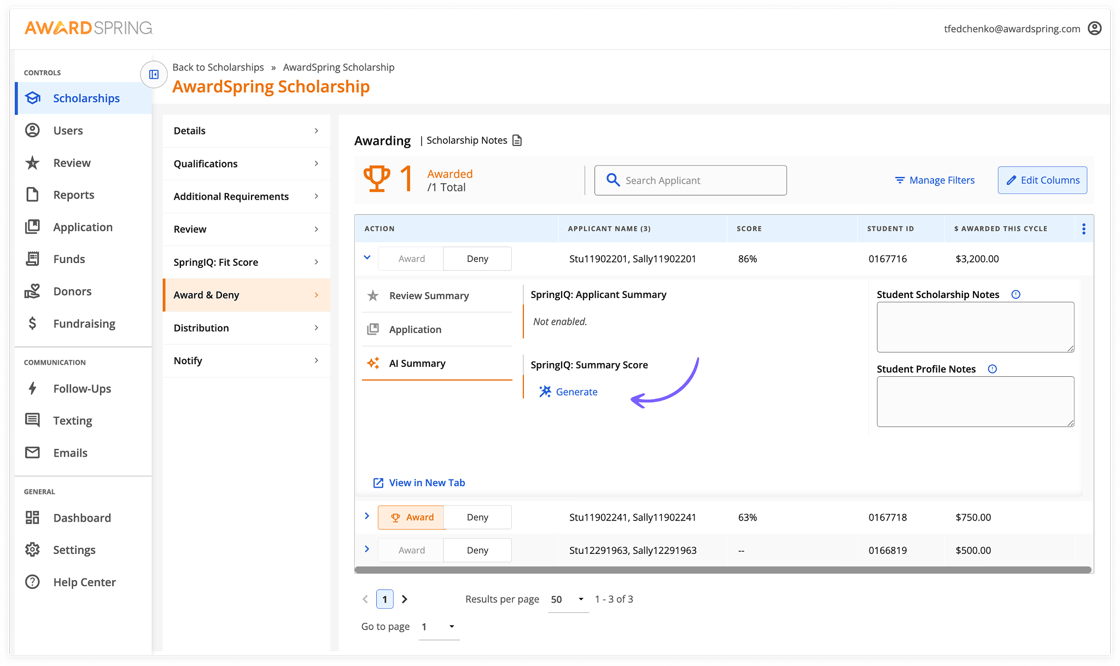
Scholarship Review (Award & Deny): Navigate to Scholarships → Award & Deny tab → Student Details → AI Summary to quickly review applicant summaries during the evaluation process.
On-Demand SpringIQ: Summary & Score
If you notice a summary and score hasn't been added, you can simply click 'Generate' when you expand on a student under the Award & Deny tab.